You will need:
- Arduino
- Arduino Joystick Shield
- Python (preferably 2.7.6)
- Arduino IDE
- Windows computer (Mac and Linux won’t work)
- Zip file containing all needed code (see below)
Step 1
Download and extract the zip to a new folder.
Step 2
In this new folder you will find a subfolder called Sendkeys. Open up this Sendkeys folder and find the setup.py. Right click inside of Windows Explorer in empty space and Shift+Right-Click, Select “Open command window here”. Then in the window type “python setup.py install” without the quotes. If the command prompt cannot find the command “python”, see this link and follow the instructions under the first answer.
Step 3
Open up the spatter.ino file. Select the correct port in Tools->Serial Port and take note of the port number. Click upload. When it is done, open the serial monitor in the tools menu and make sure you see a message being sent from the Arduino.
Step 4
Run joystick-driver-windows.py and type in the COM port you are using. It should say that a connection has been established.
Step 5
At this point you should be able to run the Flight Simulator and fly to your hearts content. Enjoy!
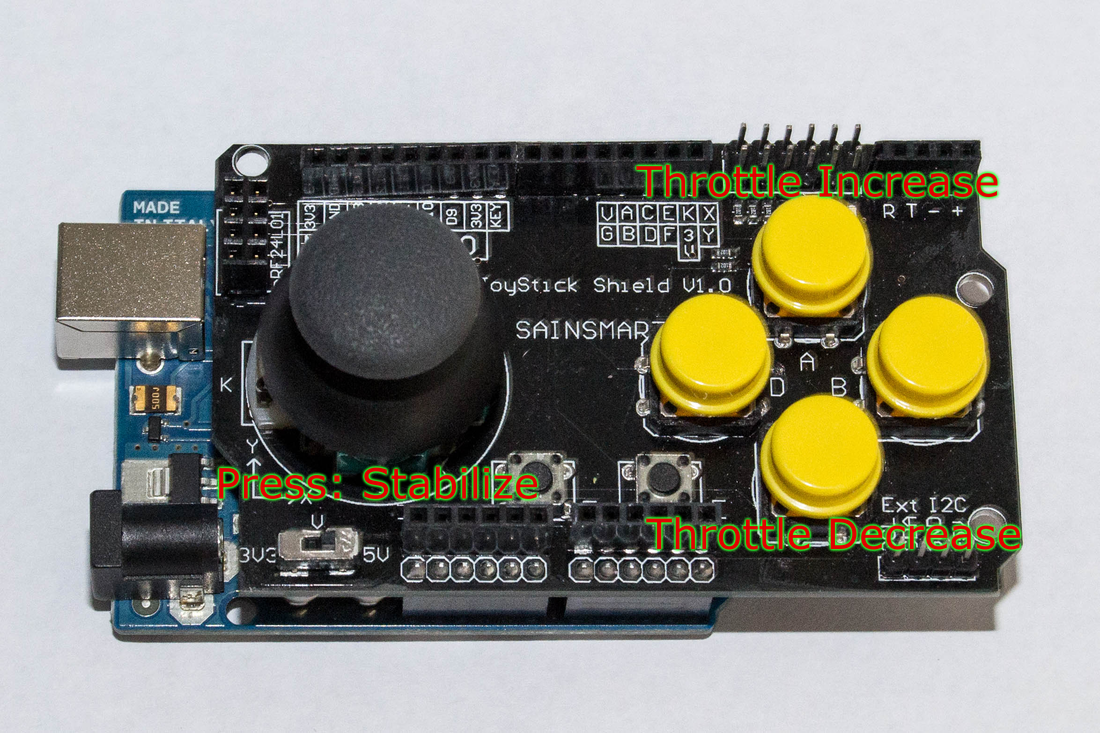
(See below for key layout.)
Linux/Mac support:
Long story short. If this tutorial doesn’t do exactly what you want to do. Get an Arduino Leonardo.
 Fully-Loaded Geek